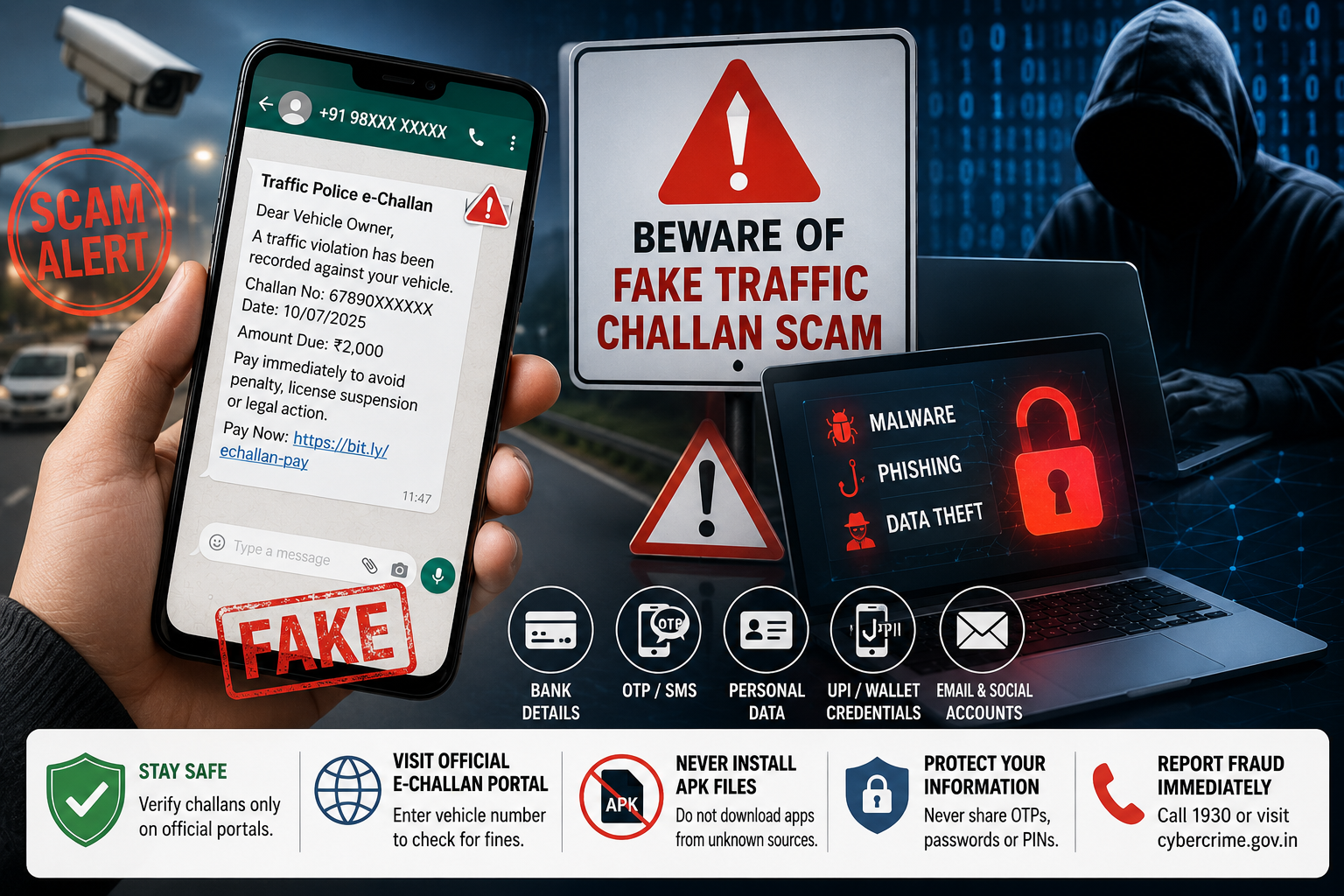
Cybercriminals Are Using Fake e-Challan Notices to Install Malware and Steal Banking Credentials; Government Urges Citizens to Verify Fines Only Through Official Platforms
The Press Information Bureau (PIB) has issued a nationwide advisory warning citizens about a rapidly spreading cyber fraud in which scammers are impersonating traffic authorities and sending fake traffic challan notifications through WhatsApp and SMS. The fraudulent messages claim that recipients have pending traffic fines and urge them to make immediate payments through suspicious links, exposing users to malware attacks, identity theft and financial fraud.
The warning comes as cybercriminals increasingly exploit the trust people place in government services. By designing messages that closely resemble genuine e-Challan notifications, fraudsters are successfully deceiving users into clicking malicious links or downloading harmful files that can compromise their smartphones and banking information.
The PIB's Fact Check Unit has urged the public to remain vigilant and verify every traffic challan only through official government portals, emphasizing that a few moments of caution can prevent significant financial losses.
How the Fake Traffic Challan Scam Operates
The scam typically begins with a text message or WhatsApp notification informing the recipient that a traffic violation has been recorded against their vehicle.
The message usually claims that:
-
A traffic challan is pending.
-
Immediate payment is required.
-
Failure to pay could result in additional penalties.
-
Driving licence suspension or legal action may follow.
-
A payment link has been provided for convenience.
The language is intentionally designed to create panic and urgency, encouraging recipients to act immediately rather than verify the authenticity of the message.
Once the victim clicks the embedded link or downloads the attached file, cybercriminals may gain unauthorized access to the device and its stored information.
Malware Hidden Behind Fake Payment Links
According to cybersecurity experts, many of these fraudulent messages contain dangerous files disguised as official documents.
These may include:
-
APK installation files.
-
Fake payment applications.
-
PDF attachments carrying malicious code.
-
Links redirecting users to phishing websites.
Installing these files can allow attackers to secretly access the victim's smartphone, monitor activities and steal confidential information without the user's knowledge.
In many cases, the victim remains unaware that the device has been compromised until unauthorized financial transactions begin to appear.
What Information Can Scammers Access?
Once malicious software is installed, cybercriminals may attempt to collect a wide range of sensitive information, including:
-
Mobile banking usernames and passwords.
-
Debit and credit card details.
-
One-Time Passwords (OTPs).
-
UPI credentials.
-
Aadhaar and PAN information.
-
Contact lists.
-
Personal photographs and documents.
-
Email login credentials.
-
Social media account passwords.
Some advanced malware can even monitor screen activity and intercept SMS messages, allowing fraudsters to bypass banking security measures.
Why the Scam Is Becoming More Dangerous
The latest fake challan scam reflects a broader trend in cybercrime where fraudsters increasingly impersonate trusted institutions rather than creating obviously fake messages.
Modern phishing attacks use:
-
Official government logos.
-
Authentic-looking challan numbers.
-
Professional language.
-
Government-related terminology.
-
Similar website designs.
-
Fake customer support numbers.
These tactics make fraudulent communications appear genuine, increasing the likelihood that users will fall victim.
The rapid growth of digital payments and online government services has unfortunately created new opportunities for cybercriminals to exploit public trust.
PIB Advises Citizens to Ignore Suspicious Messages
The Press Information Bureau has clearly advised citizens not to click on any traffic challan link received through unsolicited SMS or WhatsApp messages.
Instead, users should independently verify whether any challan has actually been issued by visiting the official government e-Challan portal.
The PIB also warned people never to install applications distributed through messaging platforms, especially APK files, as genuine government services do not require users to install unofficial software.
How to Verify a Genuine Traffic Challan
If you receive a message claiming that a traffic fine is pending, follow these safe verification steps:
-
Open your web browser manually.
-
Visit the official government e-Challan portal.
-
Enter your vehicle registration number or challan details.
-
Verify whether any penalty actually exists.
-
Make payments only through authorized government payment gateways.
Avoid accessing government services through links shared in unsolicited messages.
Common Warning Signs of a Fraudulent Challan
Users should be cautious if a traffic challan message:
-
Demands payment within minutes or hours.
-
Threatens immediate legal action.
-
Comes from an unknown mobile number.
-
Includes shortened or suspicious web links.
-
Requests installation of an APK file.
-
Contains spelling or formatting mistakes.
-
Asks for banking passwords or OTPs.
-
Promises discounts for instant payment.
Cybersecurity experts note that creating urgency is one of the most common psychological techniques used by online scammers.
Why APK Downloads Pose Serious Risks
Unlike applications downloaded through official app stores, APK files bypass Google's security screening process.
Once installed, malicious APK files can:
-
Read incoming SMS messages.
-
Capture OTPs.
-
Record passwords.
-
Monitor banking applications.
-
Access confidential files.
-
Install additional malware.
-
Spy on device activity.
For this reason, users should never install applications received through WhatsApp, SMS or email unless they originate from a verified source.
Rise in Government Impersonation Scams
The fake traffic challan fraud is part of a growing wave of scams involving impersonation of government departments.
Recent cyber frauds have included fake:
-
Income Tax refund notices.
-
Electricity bill disconnection alerts.
-
PAN verification messages.
-
Aadhaar update requests.
-
Digital arrest threats.
-
Courier delivery notifications.
-
Bank KYC verification messages.
Cybercriminals rely on people's trust in government institutions to increase the credibility of these scams.
What to Do If You Clicked a Fraudulent Link
If you accidentally interacted with a suspicious message, immediate action is essential.
Experts recommend:
-
Disconnecting the device from the internet.
-
Uninstalling any recently downloaded unknown applications.
-
Changing passwords for banking and email accounts.
-
Contacting your bank immediately if financial information was entered.
-
Running a trusted antivirus scan.
-
Monitoring bank statements for suspicious transactions.
-
Enabling two-factor authentication wherever available.
Acting quickly can significantly reduce the chances of financial loss.
Report Cyber Fraud Without Delay
The Government has urged victims to report suspected cybercrime immediately.
Citizens can seek assistance through:
-
National Cyber Crime Reporting Portal
-
National Cybercrime Helpline – 1930
Timely reporting helps authorities freeze fraudulent transactions, investigate cybercriminals and protect other potential victims.
Digital Awareness Is the First Line of Defence
India's rapid digital transformation has made online payments and government services more convenient than ever before. However, it has also increased the importance of cybersecurity awareness among citizens.
Experts advise users to follow basic cyber hygiene practices:
-
Verify every unexpected payment request.
-
Never share OTPs or passwords.
-
Download applications only from official app stores.
-
Keep smartphones updated with the latest security patches.
-
Install trusted antivirus software.
-
Remain cautious of messages creating unnecessary urgency.
Developing these habits can dramatically reduce the risk of falling victim to phishing attacks.